

YouTube has officially launched its much-anticipated likeness-detection technology for eligible creators in the platform’s Partner Program, following its pilot phase. This move is a major step in the platform’s efforts to address the misuse of AI-generated content that impersonates creators’ faces or voices.
What the Tool Does
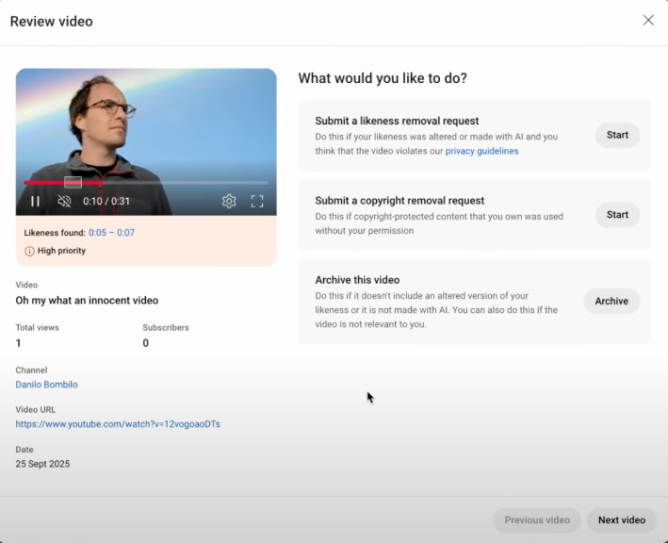
The YouTube likeness-detection tool identifies and flags videos in which a creator’s face or voice has been used without permission via generative AI. Once detected, eligible creators can request video removal, classification via copyright claim, or opt to archive the content.
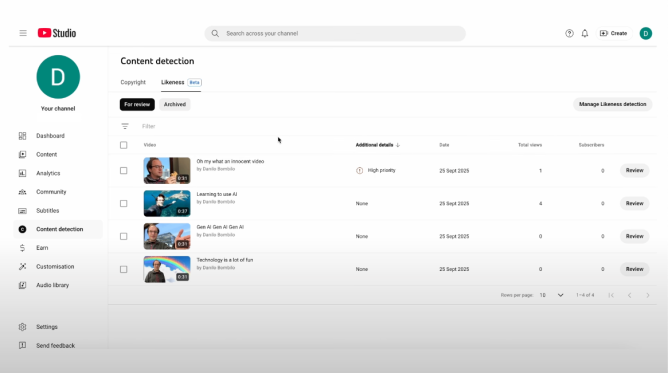
The onboarding process includes:
- Navigating to the “Likeness” tab in YouTube Studio
- Consenting to data-processing terms
- Scanning a QR code to open a web verification flow
- Uploading a photo ID and recording a short selfie video
Once approved, creators gain access to a dashboard listing detected videos and removal options.
Creators can also opt out of the system; YouTube says it will stop scanning their content for new likeness misuse within 24 hours of opting out.
Why This Matters for Creators
With generative-AI tools now capable of convincingly mimicking voices and faces, creators face growing risks of impersonation and unauthorized endorsements. One example cited by YouTube involves a company using an AI clone of a YouTuber’s voice in promotional material.
The likeness detection tool offers creators early access to protect their personal brand and digital presence — especially as traditional copyright systems struggle to adapt to AI-driven content.
Rollout Timeline & Scope
- The first wave of rollout is currently open to select eligible creators, who received emails on Tuesday morning.
- According to reports, the tool will expand to all creators in the YouTube Partner Program by January 2026.
- The feature builds on YouTube’s earlier announcements about developing “likeness management” tools in 2024.
How It Compares With Other Safeguards
This initiative complements YouTube’s broader effort to combat synthetic-media misuse, including tools to identify AI-generated singing, voice mimicry and content scrapers. By tying likeness detection to the YouTube Studio workflow and verification process, YouTube moves toward a more proactive stance on impersonation.
What Creators Should Know & Do
- If you’re a monetized YouTube creator, check your inbox for an eligibility email and look for the “Likeness” tab in Studio.
- Go through the identity-verification flow promptly if you want access to the dashboard.
- Review detected videos carefully and choose removal, copyright claim or archive options.
- Stay aware of personal brand misuse: monitor unusual uploads, voice-mimicking ads or videos attributing statements to you that you never made.
- Educate your community: inform fans of this protection so that your audience remains vigilant about fake content in your name.
What to Watch Going Forward
- Effectiveness: How accurate is the detection? Will false positives or negatives undermine trust?
- Coverage: When will the tool roll out globally and across languages?
- Expansion: Will YouTube extend similar controls for non-face/voice likenesses (e.g., movement, mannerisms, avatars)?
- Industry impact: Will this become a standard for other platforms facing deepfake and impersonation risks?