

Agentic coding in Xcode is now officially live—and it’s a major shift in how Apple developers build software. On Tuesday, Apple announced the release of Xcode 26.3, bringing fully agentic AI coding tools directly into its flagship development environment.
With the update, developers can now use AI agents from Anthropic and OpenAI—including Claude Agent and OpenAI’s Codex—natively inside Xcode to explore projects, write code, run tests, and fix errors autonomously.
What Agentic Coding in Xcode Actually Does
Unlike basic code suggestions or chat-based helpers, agentic coding in Xcode allows AI models to operate with deeper access to the IDE itself.
At launch, the agents can:
- Analyze project structure and metadata
- Modify and generate code across files
- Build projects and run automated tests
- Identify errors and iterate fixes
- Reference Apple’s latest developer documentation and APIs
This enables multi-step automation that mirrors how experienced developers actually work—rather than isolated prompt-based coding.
Built on MCP for Maximum Flexibility
Apple says Xcode 26.3 uses Model Context Protocol (MCP) to expose its tools and capabilities to AI agents. That means agentic coding in Xcode isn’t limited to OpenAI or Anthropic.
Any MCP-compatible AI agent can potentially:
- Manage files
- Apply code changes
- Generate previews and snippets
- Access real-time documentation
This design choice keeps Xcode extensible while avoiding lock-in to a single AI provider.
Optimized for Performance, Not Token Waste
To make agentic coding practical inside a professional IDE, Apple worked closely with OpenAI and Anthropic to optimize token usage and tool calling, ensuring the agents run efficiently without unnecessary latency or cost.
Developers can download their preferred agents from Xcode settings, connect accounts or API keys, and select specific model versions—such as GPT-5.2 Codex or lighter alternatives—via a simple drop-down menu.
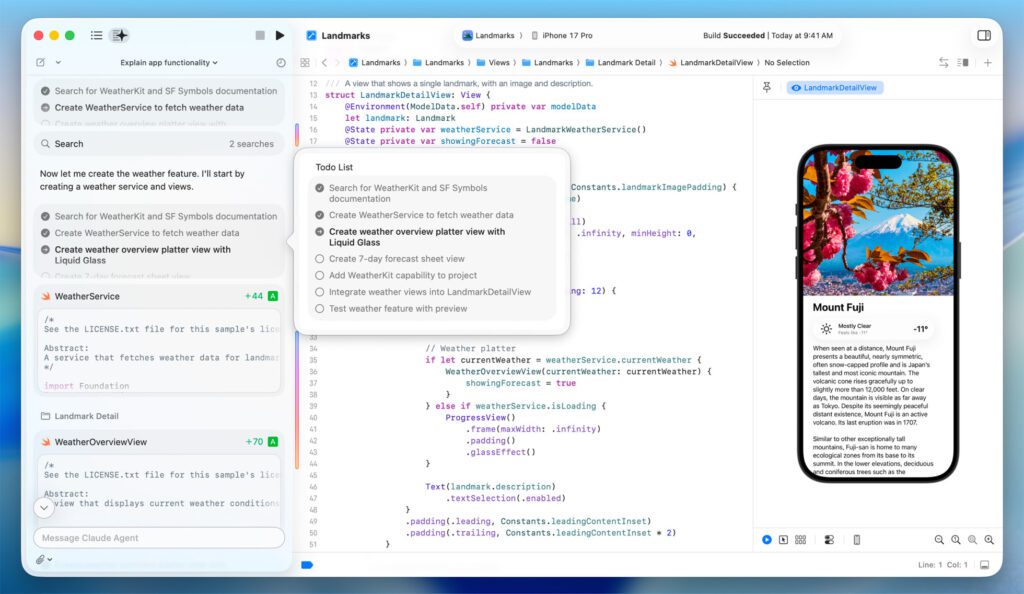
How Developers Use Agentic Coding in Xcode
Using natural language prompts in a sidebar, developers can instruct the agent to:
- Build a new feature using Apple frameworks
- Refactor existing code
- Debug failing tests
- Explain how a project works
As the agent works, it transparently breaks tasks into steps, highlights code changes visually, and logs its reasoning in a project transcript—making it easier to follow what’s happening behind the scenes.
Apple believes this transparency is especially valuable for new developers learning to code, not just seasoned professionals chasing productivity gains.
Safety Nets Built In
If developers don’t like the results, agentic coding in Xcode includes easy rollback. Xcode automatically creates milestones after every agent-driven change, allowing users to revert instantly to earlier states.
At the end of each task, the agent verifies its own output by running tests. If something fails, it can iterate again—especially when prompted to plan before writing code, a technique Apple says often improves results.
Education and What’s Next
To support adoption, Apple is hosting a live code-along workshop on its developer site, where developers can learn agentic workflows in real time using their own Xcode installs.
With agentic coding in Xcode, Apple is signaling that AI agents are no longer experimental add-ons—they’re becoming first-class tools in mainstream software development.

Don’t miss out on our latest news—follow us for the latest AI news, breakthroughs, and insights that matter.