In today’s digital world, creating captivating videos quickly is more important than ever. Whether you’re a content creator, marketer, or business owner, having the right AI video generator can streamline your workflow and boost engagement. Enter Pixverse AI — a powerful tool that transforms simple text and images into stunning videos faster than you’d expect.
In this article, we’ll explore what makes Pixverse AI stand out, dive into its key features, and show how it can unlock your creative potential.. We’ll explore its features, usability, pricing, and why it might be the perfect fit for your video creation needs. Ready to see how AI can bring your ideas to life effortlessly? Let’s get started.
What is Pixverse AI?
Pixverse AI is an innovative AI video generator that enables users to create professional-quality videos from simple text prompts and images. By leveraging advanced artificial intelligence algorithms, Pixverse AI automates the video creation process, significantly reducing the time and effort typically required in traditional video editing.
This platform is designed to cater to both beginners and experienced content creators who want to produce engaging videos quickly. Whether for social media content, marketing campaigns, or personal projects, Pixverse AI offers an intuitive interface combined with powerful features that make video generation accessible and efficient.
With features like text-to-video conversion, image-based animations, and customizable templates, Pixverse AI is poised to revolutionize how creators approach video production. It’s particularly celebrated for its speed and ease of use, enabling users to generate high-quality videos in just a few clicks.
Key Features of Pixverse AI
Pixverse AI stands out as a top-tier AI video generator packed with features that make creating stunning videos from text and images both fast and effortless.
- Text-to-Video Generation: Transform detailed text prompts into dynamic, high-quality videos. Whether it’s storytelling, marketing content, or creative projects, Pixverse AI automates the entire video creation process from written ideas.
- Image-to-Video Conversion: Bring static photos or illustrations to life with smooth animations, transitions, and engaging visual effects.
- High-Quality Outputs: Create videos up to 1080p HD resolution with lifelike motion, realistic physics, and consistent character details, ideal for professional use.
- Fast Processing Speed: Videos are generated in as little as 5 to 10 seconds on average, enabling quick turnaround for rapid content creation or social media trends.
- Stylized and Realistic Videos: Choose between impressive cinematic, animated, or realistic visual styles to suit your project needs.
- User-Friendly Interface: Designed for creators of all skill levels with intuitive controls, making the creation process simple and accessible without any technical expertise.
- Free Tier Availability: Start experimenting risk-free with a free plan that includes daily credits and watermark-free videos at standard resolutions.
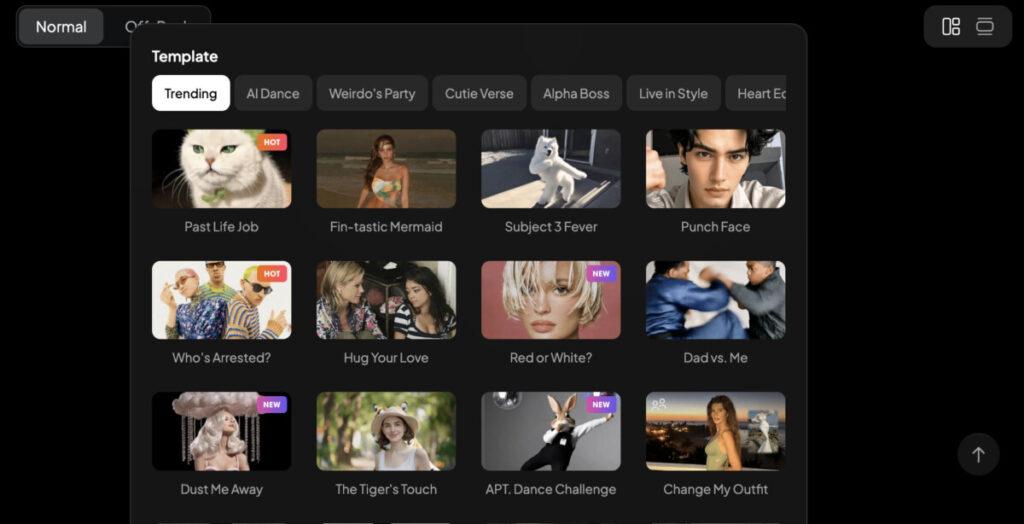
- Personalized Prompts and Templates: Use text prompts, reference images, or a combination to customize videos. Access a library of templates that cater to viral social media trends like hugs, kisses, fantasy transformations, and more.
These features make Pixverse AI ideal for marketers, digital creators, educators, or anyone looking to bring their ideas to life quickly and professionally without the traditional video production complexities.
How to Use Pixverse AI to Create Videos Fast
Creating videos with Pixverse AI is designed to be a smooth and straightforward process that anyone can master in minutes. Here’s a quick step-by-step guide to help you get started:
- Sign Up and Log In: Visit the Pixverse platform and create a free account or log in if you already have one.
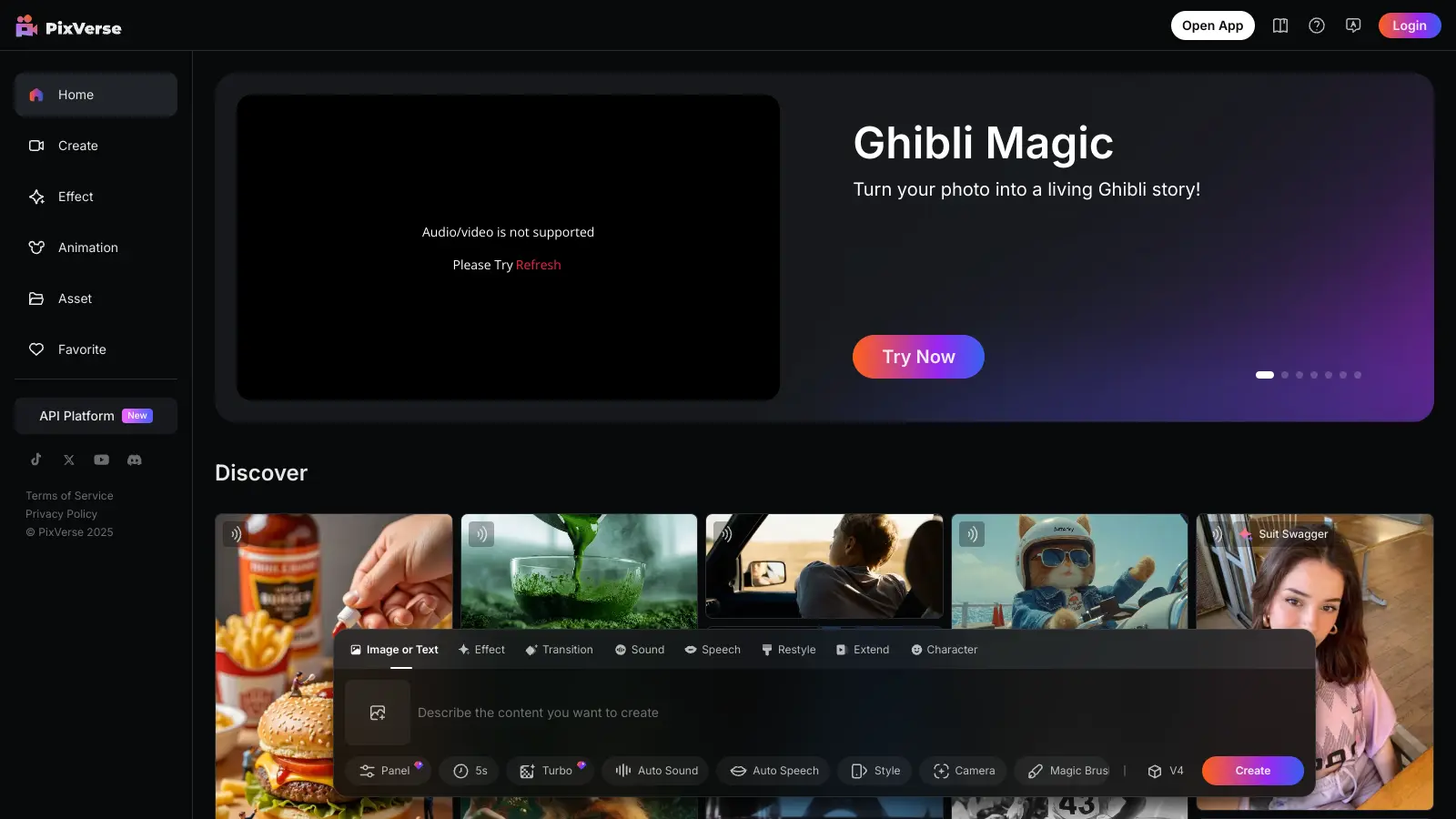
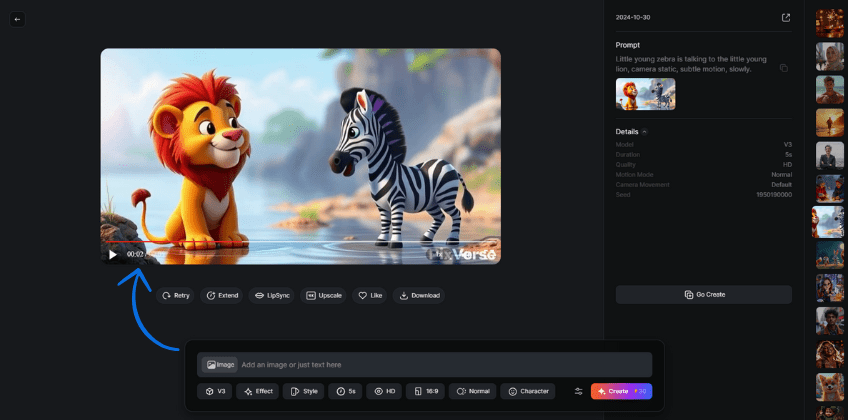
- Choose Your Creation Method: Select whether you want to generate a video from text prompts or images. The user-friendly dashboard makes it easy to navigate between options.
- Input Your Content:
- For text-to-video, simply type your script or idea into the prompt box.
- For image-to-video, upload your photos or select from the library.
- Customize Your Video: Select from available templates, styles, and effects to tailor the video to your needs. Adjust scene durations, add background music, voiceovers, or animations as desired.
- Preview and Edit: Use the preview option to see your video. Make any necessary adjustments to ensure it matches your vision.
- Generate and Download: Click the generate button—your video will be processed in a matter of seconds or minutes depending on the complexity. Once ready, download your video in your preferred resolution.
- Share or Publish: Distribute your video directly on social media or embed it into your website for maximum engagement.
Tips for Faster Video Creation
- Use templates for quicker start.
- Keep prompts concise and clear for better results.
- Use high-quality images and detailed descriptions for more accurate outputs.
- Utilize bulk uploads if creating multiple videos.
By following these steps, creators can produce high-quality videos rapidly, making Pixverse AI perfect for real-time marketing, social media content, or quick project turnarounds.
Pixverse AI Pricing Plans
Pixverse AI offers a variety of pricing plans to suit different needs, from casual users to professional enterprises. Here’s a comparison of the key options:
| Tier | Monthly Price | Credits/Month | Resolution & Features | Additional Benefits |
|---|---|---|---|---|
| Free | $0 | 90 initial + 30 daily | 720p videos, watermark-free, basic features | Perfect for testing and experimentation |
| Standard | $10 | 1,200 credits | 1080p videos, faster rendering, no watermark, unlimited models | Suitable for small projects, casual creators |
| Pro | $29 | 3,000 credits | Priority queue, commercial license, more advanced features | Ideal for professionals and small teams |
| Premium | $59 | 10,000 credits | Fastest queue, extended support, team options | For enterprise or heavy usage |
Credit Usage & Additional Costs
- Typically, generating a standard video uses about 1 credit.
- Higher resolutions, longer videos, or special effects may consume more credits.
- Additional credits can be purchased if needed, starting at about $10 for extra 1,000 credits.
Pixverse recent updates reflect a competitive pricing structure designed to accommodate everyone from beginners to enterprise-level users. While the free plan is perfect for exploring basic features, the paid plans provide increasing capabilities, faster processing, and better video quality—suitable for serious content creators or businesses.
Pixverse AI System Requirements and Specifications
Pixverse AI is designed to be accessible across multiple platforms, supporting a range of devices and systems with minimal technical barriers. Here’s what you need to know about its system requirements and video specifications:
Supported Platforms
- Web: Accessible via modern browsers like Chrome (recommended), Firefox, Safari, and Edge with a stable internet connection.
- Mobile: Available as an app on iOS 15.0+ devices and Android 9.0+ smartphones/tablets.
- Desktop: Compatible with macOS 12.0+ (requires Apple M1 chip or later).
Technical Video Specifications
- Resolution Support:
- 360p, 540p, 720p HD, 1080p Full HD (up to 4K on enterprise plans)
- Aspect Ratios: 16:9 (standard widescreen), 9:16 (vertical), 1:1 (square), 4:5 (portrait), and cinematic 2.39:1.
- Frame Rate: 16 or 24 FPS depending on model and settings.
- Duration: Default video lengths are around 5-8 seconds, optimized for social media clips and short-form content.
- Input Image Requirements: Supports JPG, PNG, WebP, HEIC, with image sizes between 300-4000 pixels up to 20MB max.
- Output Formats: MP4 (H.264), WebM, short GIF animations.
System Recommendations
- At least 4GB RAM on web platforms (8GB+ recommended for smooth performance)
- Reliable internet connection (minimum 5 Mbps, 10+ Mbps recommended for HD uploads/downloads)
- Mobile devices should have minimum 3GB RAM and 100 MB free space.
Pixverse AI also offers advanced API integration for developers, enabling programmatic video generation with custom parameters such as effects, camera movements, and motion modes, making it suitable for various professional and enterprise workflows.
These system and technical specs ensure flexible, high-quality video generation capable of fitting diverse creator needs, from casual users to professionals aiming for cinematic output.
Pixverse AI Mod APK: What You Should Know
Some users search for the Pixverse AI Mod APK, a modified version of the app that claims to unlock premium features for free. However, it’s an unofficial third-party version often found outside official app stores.
Risks:
- May contain malware or spyware, risking data and device security.
- Violates Pixverse AI’s terms, leading to possible bans or legal issues.
- Lacks official updates, support, and new features.
- Undermines the developers behind the app.
Safer Alternative:
Use the official Pixverse AI app from the Google Play Store or Apple App Store, or website, which offers a free plan with daily credits and optional paid upgrades for faster processing and better quality. It’s secure, regularly updated, and supports ongoing innovation in AI video creation.
User Reviews and Feedback
Pixverse AI has garnered a strong following and generally positive reviews from users across platforms. Here’s a summary of real user feedback highlighting what people like and where they see room for improvement:
What Users Like
- Beginner-Friendly Interface: Many users find Pixverse AI extremely accessible, requiring no prior video editing skills. The clean, intuitive dashboard and simple “Create” button make video generation quick and easy.
- Fast Video Generation: Videos typically render within 30 to 90 seconds, enabling rapid iteration and content creation without long wait times.
- High-Quality Visuals: Users praise the platform for producing crisp animations with realistic lighting, camera movements, and character details, especially in cinematic and stylized effects.
- Flexible Input Options: Both text-to-video and image-to-video features are well-received for their versatility and quality results.
- Free Plan Perks: The free tier includes watermark-free videos and daily credit renewal, which many users appreciate as a generous way to explore the platform.
- Cross-Platform Support: Works smoothly on mobile devices and browsers without the need for bulky software installations.
- Templates for Social Media: The variety of trending, social-media-friendly templates help users create viral-ready content quickly.
Areas for Improvement
- Short Video Length: Most clips are limited to about 6 seconds, which can be restrictive for longer storytelling or presentations.
- No Audio Support: Videos currently lack integrated soundtracks, music, or voiceovers, requiring external editing to add audio.
- Variable Prompt Sensitivity: Results can vary significantly based on how prompts are written; small tweaks might produce drastically different outputs.
- Limited Scene Customization: Users cannot alter camera angles, scene pacing, or transitions beyond the AI’s default settings.
- Occasional Logical Inconsistencies: Some users report minor oddities such as misplaced objects or slightly unnatural animations in complex scenes.
Overall Impression
Most users agree Pixverse AI strikes a great balance between speed, usability, and output quality, especially for quick social media clips or idea visualization. While not a full replacement for traditional video editors or creators looking for detailed customization, it’s a powerful tool for anyone wanting AI-powered videos without the complexity.
These insights position Pixverse AI as one of the leading choices in the AI video generator market, praised for democratizing video creation through AI innovation.
Conclusion
Pixverse AI is one of the top AI video generators, transforming content creation with its speed, simplicity, and high-quality results. Whether you’re a creator, marketer, or business owner, it helps you turn text and images into professional videos in minutes—no editing skills required.
With cinematic visuals, smooth animations, and constant updates like the latest V5 model, Pixverse AI keeps setting new standards in AI video creation. It’s already a viral favorite on TikTok and Instagram, empowering millions to create engaging content easily.
Experience the future of video creation and watch your ideas come to life effortlessly with Pixverse AI.