If you’ve been waiting to try OpenAI’s viral video app, here’s the news: you can now use Sora 2 without invite code. No more waitlists or secret access links — the doors are open.
Sora 2, developed by OpenAI, turns simple text prompts into hyper-realistic, cinematic videos in seconds. Initially, it was limited to early testers, but OpenAI has now expanded access in the U.S., Canada, Japan, and South Korea.
In this guide, you’ll learn exactly how to access Sora 2 no invite code, get started fast, and unlock its most powerful features.
What Is Sora 2 and Why It’s Blowing Up
Sora 2 is OpenAI’s AI-powered short-video generator and social feed that converts text prompts into realistic moving images and scenes. It’s designed to be as easy to use as a social app (browse a vertical feed, remix clips, share), while offering surprisingly advanced visuals and storytelling capability for a mobile tool.
Why it’s gaining traction fast:
- Studio-quality outputs from simple prompts. Users can generate cinematic scenes, animated sequences, or photorealistic clips with a single prompt. This lowers the bar for creators and small teams.
- Social-first UX. Sora blends generation with discovery—users can scroll, remix, and reshare clips just like they would on TikTok or Instagram. That mix of creation + distribution sparks rapid viral use.
- Phased rollout, easing capacity and moderation. OpenAI moved from invite-only to limited open access in selected countries to manage demand and moderation challenges while iterating on safeguards. That’s why some regions can access Sora 2 invite-free right now while others remain invite-only.
The Big Update — You Can Now Use Sora 2 Without Invite Code
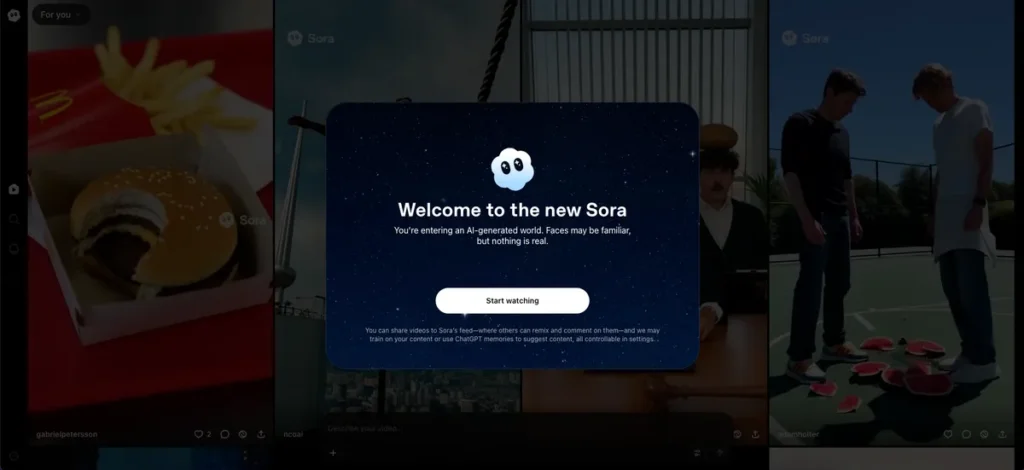
The game has officially changed. OpenAI has rolled out Sora 2 invite-free access, meaning anyone in supported regions can now use the app without waiting for an invite or approval.
Until recently, Sora 2 was in a closed beta, available only to selected creators. But after overwhelming demand and viral clips flooding social media, OpenAI lifted the restriction. Now, users in the U.S., Canada, Japan, and South Korea can sign in and start generating AI videos instantly.
Here’s what this means:
- No need for special access codes
- Instant account setup using your OpenAI or Google login
- Access to the full suite of Sora 2 video tools
If you’re outside these regions, OpenAI has hinted at a global rollout coming soon, so early sign-ups can help you get Sora 2 invite-free access the moment it expands.
How to Download and Log In to Sora 2 (No Code Needed)
Getting into Sora 2 is super easy now. Here’s how to start:
- Download the Sora app from the Apple App Store.
- Log in using your ChatGPT or ChatGPT Plus account.
- You’re in — no invite code required!
Once inside, you can scroll through a feed filled with AI-generated videos, share your favorites, or even create your own clips using OpenAI’s tech magic.
Note: This code-free access is currently available only in the US, Canada, Japan, and South Korea. Users elsewhere still need a code or must wait for the global rollout.
Not in a Supported Country? Here’s How to Get a Sora Invite Code
If you’re outside the rollout zones, don’t worry — there are still ways to get in. Here’s your guide:
- Download Sora from the App Store (look for the navy-and-white cloud icon).
- Sign in using your ChatGPT account.
- Tap “Notify me when access opens.”
- Allow notifications to stay updated on availability.
OpenAI says it’s expanding quickly to more regions and giving priority to ChatGPT Plus users — but you don’t need to be a paying subscriber to join once you get your invite code.
Even better, once you’re in, you’ll get four new invite codes to share with your friends.
Using Sora 2 on Android or Web
If you’re an Android user, there’s a small catch — you can’t scroll through Sora’s AI video feed yet.
But there’s good news: you can still create AI video clips through the web browser version of Sora using an invite code.
This makes it easy for non-iOS users to explore Sora’s generative video features before full Android support arrives.
Bonus: How to Find Sora 2 Invite Codes via Discord
If you can’t wait for OpenAI’s email notification, Discord might be your golden ticket. Here’s what to do:
- Join the official OpenAI Discord server.
- Link your ChatGPT account to your Discord profile (OpenAI provides step-by-step instructions).
- Wait patiently — it can take up to 15 hours for account verification.
- Once verified, go to the #sora-2-codes channel.
- Politely ask if anyone has an extra invite code to share.
Reminder: Selling Sora 2 codes violates OpenAI’s server rules — share them freely and respectfully.
Key Features You Can Explore Right Now
Now that you can use Sora 2 without invite code, here’s what makes it stand out from other AI video tools:
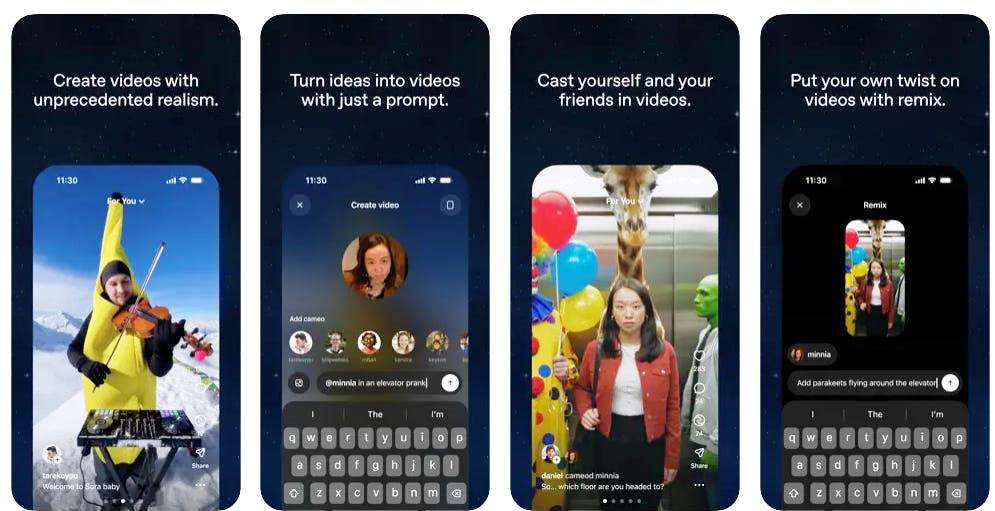
- Ultra-Realistic Video Generation: Turn text prompts into cinematic, lifelike scenes with impressive detail and smooth motion.
- Smart Prompt Control: Add camera directions like “pan,” “zoom,” or “slow motion” to shape your video exactly how you imagine it.
- Built-In Audio & Motion Sync: Sora 2 auto-generates ambient sound and natural movement — no manual editing needed.
- Social Remix Feed: With Sora 2 invite-free access, browse, remix, and share AI videos in an interactive community feed.
- Quick Export & Sharing: Instantly download or post HD videos to TikTok, Instagram, or X.
Pro Tip: Combine descriptive prompts with style cues (e.g., “dreamlike,” “cinematic,” “documentary tone”) for stunning results.
Conclusion — Jump In and Create Your First AI Video
The wait is over — you can now use Sora 2 without invite code and start creating cinematic AI videos instantly.
With Sora 2 invite-free access, OpenAI has made video generation simple, fast, and available to everyone. Just sign in, type your idea, and watch it turn into a stunning video in seconds.
No codes. No waitlist. Just creativity.
👉 Try it now on the official Sora 2 page and create your first AI video today.