Imagine cutting a three-week sprint down to two days — not by rushing, but by letting an AI assistant understand your goals and execute clean, reliable code. That’s what Claude Code offers when used with the right Claude Code best practices. Learn how to craft structured prompts, organize repositories, and fine-tune agent workflows so Claude becomes a productive part of your team.
Unlike simple autocomplete tools, Claude Code is an agentic coding assistant that connects to repositories, runs in terminals, and manages multi-step tasks. When guided well, it speeds up debugging, scaffolding, and documentation; when misused, it can break builds or overwrite key files. This guide explores proven Claude Code coding guidelines and best practices for Claude Code agents to ensure reliable automation.
You’ll learn a practical Claude Code workflow optimisation strategy—using CLAUDE.md, prompt templates, and CI/CD integration—to help you code faster and safer.
Understanding Claude Code — What It Is and How It Works
Claude Code by Anthropic is an agentic AI coding assistant built to help developers plan, write, and refine entire projects—not just complete lines of code. It acts like a reasoning partner that understands your repository, explains decisions, and executes multi-step tasks safely.
Unlike tools such as GitHub Copilot or Replit Ghostwriter, Claude Code can analyze full codebases, propose structured plans, and validate results against goals. This makes it ideal for automating refactoring, debugging, and documentation.
Key advantages:
- Understands full project context
- Executes multi-step coding tasks
- Maintains safety boundaries
- Generates clear documentation
Used strategically, these capabilities make Claude Code an invaluable partner — not just for writing code, but for maintaining a cleaner, smarter workflow.
Why Following Claude Code Best Practices Matters
Using Claude Code effectively isn’t just about prompting—it’s about discipline. Developers who follow structured Claude Code best practices get consistent, explainable results; those who don’t often face confusing errors, overwritten files, or unpredictable outputs.
When you apply the right Claude Code coding guidelines, you’re teaching the AI to mirror your workflow. It learns from your instructions, adopts your repository’s conventions, and provides outputs that fit naturally into your system. This reduces the time spent debugging and ensures cleaner commits.
Here’s why these best practices are essential:
- Efficiency: Well-structured prompts guide Claude to complete full features faster.
- Consistency: Uniform naming and documentation make collaboration seamless.
- Context retention: Clear instructions help Claude stay aligned with project goals.
- Safety: Best practices prevent destructive edits or file mismanagement.
Following best practices for Claude Code agents also ensures your automation scales. When Claude handles multiple tasks or contributors, these standards keep performance predictable and reproducible—crucial for large development teams or long-term projects.
Step-by-Step Workflow: Implementing Claude Code Best Practices
Now that you understand why best practices matter, let’s explore a practical, step-by-step workflow to help you integrate Claude Code effectively into your development process. Whether you’re automating tests or managing complex builds, this workflow ensures precision, safety, and speed — the foundation of Claude Code workflow optimisation.
Step 1 — Define Your Project and Goals Clearly
Before writing a single prompt, outline your project’s purpose, structure, and dependencies. Claude Code performs best when it understands the “what” and “why” behind your task.
- Create a brief summary or use a
CLAUDE.mdfile to describe your project’s goals. - Specify the framework, coding standards, and expected outcomes.
- Example:
Goal: Build a RESTful API using FastAPI Framework: Python 3.11 Output: Tested endpoints with JWT authentication
This gives Claude clear parameters for better code generation and version management.
Step 2 — Craft Context-Rich Prompts
Claude thrives on context. Instead of generic instructions like “write a login function,” guide it with detail:
“Write a FastAPI login function that validates JWT tokens and connects to a PostgreSQL database.”
Include:
- Relevant files or snippets (
main.py,database.py). - Function purpose and input/output expectations.
- Preferred coding conventions or docstring style.
Strong prompts lead to higher-quality, test-ready code.
Step 3 — Use Iterative Refinement for Code Quality
Treat Claude as a collaborator, not a one-shot generator. After receiving output, ask it to refine, optimize, or explain. Example follow-ups:
- “Can you refactor this for better readability?”
- “Add unit tests for these endpoints.”
- “Explain why you chose this algorithm.”
This iterative loop is central to Claude Code coding guidelines — it helps reduce errors, improve performance, and teach Claude your preferred coding style.
Step 4 — Implement Claude Code Coding Guidelines
Standardize your approach so Claude consistently meets your expectations:
- Use descriptive variable names and type hints.
- Request docstrings and inline explanations.
- Follow consistent indentation, imports, and PEP8 (or project-specific) standards.
- Regularly review generated commits to prevent logical drift.
Establishing these conventions ensures Claude’s outputs remain human-readable and maintainable.
Step 5 — Evaluate and Optimize Outputs
Before merging Claude’s work:
- Run automated tests and linters.
- Compare diffs to check for unexpected deletions or changes.
- Use Claude to summarize what it modified: “Explain all changes made to the auth module and why.”
Incorporating Claude Code workflow optimisation at this stage helps catch errors early and maintain quality over time.
Best Practices for Claude Code Agents (Advanced Developer Tips)
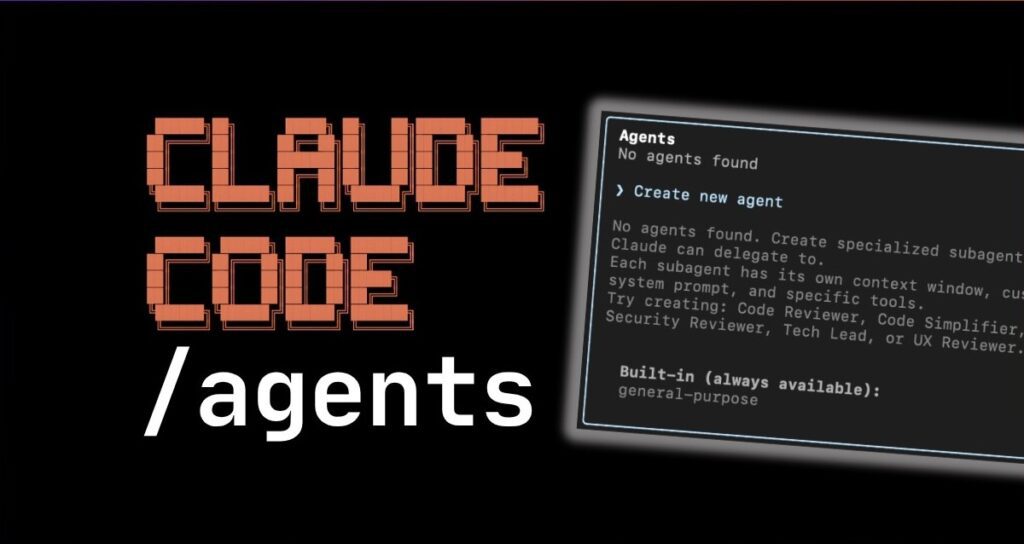
Once you’ve mastered the basics, it’s time to elevate your workflow with advanced best practices for Claude Code agents. These techniques help developers scale projects, maintain consistency, and make the most of Claude’s reasoning capabilities — all while ensuring safe, predictable automation.
1. Use Modular and Reusable Workflows
Treat your Claude Code prompts as modular components. Build reusable prompt templates for common tasks like refactoring, testing, or documentation generation.
- Example: A “Refactor + Test + Document” template that you can adapt per module.
- Store your templates in a
/promptsfolder and reference them across projects.
This approach saves time and keeps Claude’s responses consistent across repositories.
2. Manage Context Length Effectively
Claude performs best when given the right amount of context.
- Split long codebases into logical chunks before feeding them in.
- Use Claude’s summary capabilities to condense large files.
- Always specify which functions or classes are relevant to the task.
Efficient context management prevents truncation errors and keeps Claude focused on the current goal.
3. Integrate Claude with Developer Tools
For seamless workflows, integrate Claude Code with:
- VS Code or JetBrains IDEs: Enable Claude-driven suggestions directly inside your editor.
- Git and CI/CD pipelines: Automate commit summaries, changelogs, or documentation updates.
- Task runners like Make or NPM scripts: Combine automated builds with Claude-assisted code checks.
These integrations optimize your Claude Code workflow while maintaining developer oversight.
4. Use Claude for Code Review and Refactoring
Claude excels at reviewing and optimizing existing codebases. Ask it to:
- Identify redundant code or inefficiencies.
- Explain architectural weaknesses.
- Recommend improvements aligned with your coding standards.
By pairing human judgment with Claude’s deep analysis, you can significantly enhance code quality and maintain long-term project health.
5. Document Everything
Every change or suggestion Claude makes should be documented.
- Use commit messages or markdown summaries generated by Claude itself.
- Maintain a “Claude Changelog” for transparency and accountability.
Clear documentation ensures traceability and helps future developers understand why certain AI-driven choices were made.
By implementing these advanced techniques, you transform Claude Code from a smart assistant into a reliable development partner — capable of handling complex tasks with minimal supervision while maintaining code safety, style, and clarity.
Common Mistakes to Avoid When Using Claude Code
Even skilled developers can run into problems if they misuse Claude Code. Understanding what not to do is just as important as learning the right Claude Code best practices. Avoiding these common pitfalls ensures smoother automation, cleaner commits, and fewer debugging headaches.
1. Overloading Claude with Too Many Instructions
Claude performs best when tasks are clear and concise. Overly long or vague prompts can confuse its reasoning process.
❌ Don’t: Paste your entire project folder and say, “Fix this app.”
✅ Do: Target specific goals — “Refactor auth.py for better token validation.”
Breaking complex work into smaller prompts keeps Claude efficient and accurate.
2. Ignoring Context and Project Structure
Failing to provide essential details — like project goals, frameworks, or dependencies — often leads to irrelevant or broken output.
Tip: Always include file names, expected inputs/outputs, and language versions when prompting. This ensures Claude aligns its logic with your setup.
3. Skipping Human Review
Claude Code is smart, but not infallible. Never merge its commits blindly.
- Review diffs manually before pushing.
- Use automated testing and linters.
- Ask Claude to explain its changes to verify reasoning.
Human oversight remains essential for security and maintainability.
4. Ignoring Feedback Loops
Many developers fail to iterate. Instead of improving outputs through follow-ups, they settle for the first draft.
Treat Claude like a pair programmer — review its work, give feedback, and refine. Continuous iteration builds code quality over time.
5. Neglecting Documentation and Traceability
Skipping documentation breaks collaboration. Always record Claude’s key changes, especially on shared repositories.
- Add auto-generated commit notes.
- Maintain a changelog for AI-driven edits.
Documented workflows ensure clarity for future developers and accountability for every AI-assisted change.
Avoiding these mistakes strengthens your development pipeline and helps you get the most out of Claude Code workflow optimisation. With the right habits, Claude becomes a trusted collaborator — not a code risk.
Claude Code Workflow Optimisation Techniques
Once you’ve mastered the basics and avoided common pitfalls, it’s time to fine-tune your setup for Claude Code workflow optimisation. These strategies help you streamline performance, cut repetitive tasks, and make your development environment more AI-friendly.
1. Build and Reuse Prompt Templates
Save time by creating prompt templates for recurring tasks such as testing, refactoring, or documentation.
Example Template:
“Refactor the following code for readability and maintain PEP8 compliance. Then, add concise docstrings and generate a unit test suite.”
Store these templates in a /prompts folder for easy reuse. Consistency across projects makes Claude’s responses more predictable and speeds up onboarding for new team members.
2. Automate Code Reviews with Claude
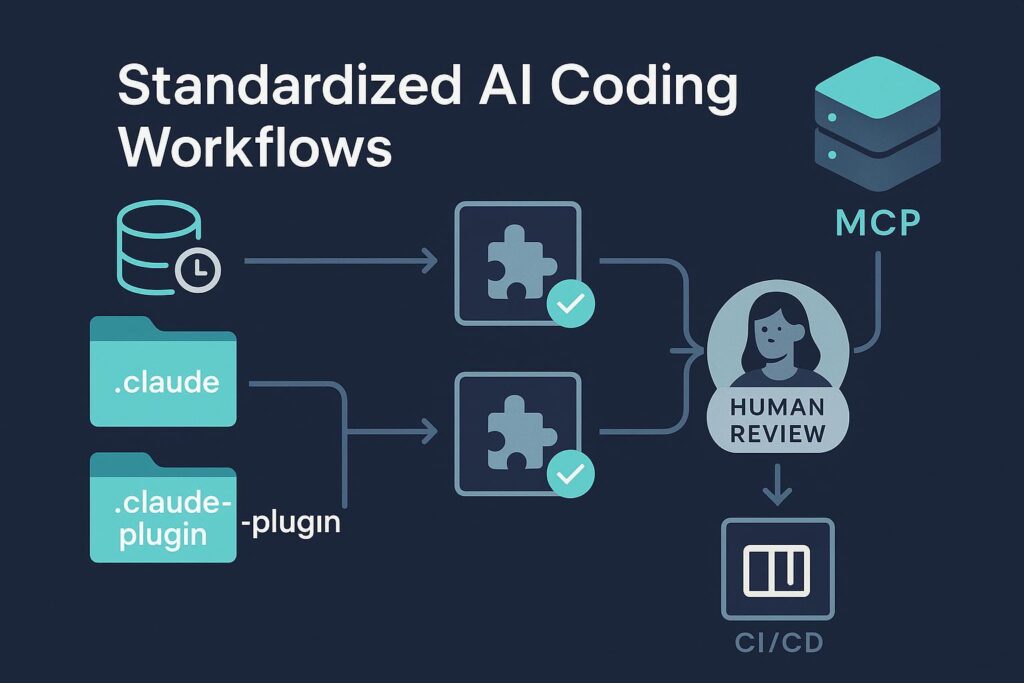
Integrate Claude into your CI/CD pipeline for automated feedback:
- Trigger Claude reviews on pull requests.
- Generate commit summaries automatically.
- Ask for documentation or changelog updates post-merge.
This continuous feedback loop improves quality assurance and reduces manual review time without compromising reliability.
3. Use Summarization for Large Repositories
Claude can summarize long code files or entire repositories. Use this feature before feeding in large contexts:
- Run a summary command to extract key logic sections.
- Feed summaries into your main prompt for better focus.
This prevents token overload while keeping Claude informed about the overall structure.
4. Implement AI-Driven Testing
Leverage Claude’s reasoning to automatically write and maintain test suites.
- Ask Claude to create new test cases when features are added.
- Have it identify gaps in coverage or logic errors.
- Use these automated tests as part of your deployment pipeline.
Testing through Claude not only improves coverage but also reinforces reliability across rapid development cycles.
5. Integrate Claude with Your DevOps Stack
Combine Claude’s automation power with your existing tools:
- GitHub Actions: Trigger Claude to summarize commits or update documentation.
- Jenkins or CircleCI: Use Claude for pre-deployment checks.
- Slack or Discord Bots: Set up Claude notifications for coding updates or errors.
Integrating these tools ensures smoother collaboration and less context-switching for developers.
6. Benchmark and Continuously Improve
Finally, track performance metrics like:
- Average response time for Claude tasks
- Error or rollback frequency
- Improvement in code review time
Regularly evaluating these metrics helps identify where your Claude workflow can be refined for even higher efficiency.
By applying these Claude Code workflow optimisation strategies, developers can automate intelligently — achieving faster releases, stronger documentation, and consistently cleaner codebases.
Real-World Case Studies
Let’s look at how developers and teams are already applying Claude Code best practices in real-world environments. These examples show how structured workflows, strong prompting, and disciplined automation lead to measurable results.
1. Startup Boosts Development Speed by 60% Using Claude Code
A small SaaS startup integrated Claude Code into its microservices architecture workflow.
- Challenge: Frequent refactoring and inconsistent documentation slowed down releases.
- Solution: The team created modular prompt templates for tasks like API endpoint generation and error handling.
- Outcome: Development cycles dropped from 10 days to 4 days, with more consistent code readability and fewer QA issues.
“Claude became our second engineer—it not only wrote code but explained every line,” shared the CTO.
2. Enterprise-Level Project Improves Code Quality and Review Time
A Fortune 500 company adopted Claude Code workflow optimisation for code reviews and documentation.
- Challenge: Hundreds of pull requests daily made manual reviews inefficient.
- Solution: Claude was integrated into the CI/CD pipeline to automatically summarize PRs and flag potential logic errors.
- Outcome: Code review time was reduced by 45%, and developers reported clearer documentation standards across teams.
3. AI Research Lab Uses Claude for Automated Documentation
A research lab working on AI simulations employed Claude Code agents to auto-generate READMEs and technical papers from code comments.
- Challenge: Keeping documentation in sync with evolving experiments.
- Solution: A “Doc-Agent” Claude template that updated markdown files whenever code changed.
- Outcome: Researchers spent 70% less time on documentation, improving collaboration and reproducibility.

Future of AI Coding: Where Claude Code Is Headed
The evolution of Claude Code marks a major shift in how developers interact with artificial intelligence. As Anthropic continues refining Claude’s reasoning capabilities, the focus is shifting from task automation to context-aware collaboration — AI that understands not just what code does, but why it does it.
1. Smarter, Contextual Understanding
Future Claude Code agents will be able to analyze an entire codebase across multiple repositories, frameworks, and languages.
This means:
- Better debugging through pattern recognition.
- Context-specific suggestions rather than generic fixes.
- Real-time refactoring without breaking dependencies.
As Claude gains deeper contextual memory, developers will spend less time maintaining code and more time innovating.
2. Seamless Multi-Agent Collaboration
Soon, developers might assign specialized Claude Code agents for distinct roles — testing, documentation, deployment, or security — that communicate autonomously.
This vision aligns with the rise of multi-agent ecosystems, where AI teammates coordinate tasks just like humans do.
Imagine a “code swarm” where Claude handles QA, commits, and even rollback management autonomously.
3. Ethical and Secure Coding Integration
As AI’s role in development expands, Claude Code best practices will also include ethical programming guidelines. Anthropic emphasizes “constitutional AI,” meaning Claude’s suggestions are grounded in safety and fairness.
Expect features like:
- Built-in checks for data privacy and bias.
- Automatic compliance documentation for secure deployment.
- Transparent coding rationale for audit trails.
4. The Human-AI Development Loop
Despite automation, human creativity remains central. The next phase of Claude Code workflow optimisation will focus on symbiotic loops — where human intent drives AI generation, and AI insights enhance human decision-making.
In short:
The future isn’t AI replacing developers — it’s AI elevating them.
Conclusion & Key Takeaways
Mastering Claude Code best practices is more than prompt writing—it’s about creating a smart, efficient workflow that makes Claude a true coding partner. By applying consistent Claude Code coding guidelines, you ensure cleaner output, faster delivery, and fewer errors.
Key benefits include:
- Higher productivity: Faster, more accurate code generation.
- Smarter teamwork: Claude adapts to your style and project context.
- Safer development: Fewer bugs and security risks.
As Claude Code workflow optimisation advances, early adopters will lead the next wave of AI-powered software development.
Takeaway: Treat Claude like a collaborator—guide it clearly, stay structured, and refine often to unlock its full power.