Ever wished you could create stunning, professional videos without spending hours on complex editing tools? That’s exactly what Pictory AI video editing promises—an intuitive, AI-powered solution that transforms your ideas into polished videos within minutes.
For creators, marketers, educators, and entrepreneurs, video content is essential—but producing it can be time-consuming and overwhelming. From writing scripts to editing visuals, the process often drains both time and energy. Pictory aims to change that with its intelligent automation that makes video editing effortless.
Whether you’re turning a blog post into a YouTube video or summarizing a webinar for social media, Pictory removes the barriers between inspiration and the final product. But does it truly deliver on its promise of simplicity and efficiency?
In this review, we’ll explore Pictory AI’s standout features, pricing, and why many users call it one of the best AI video editors- backed by real user feedback, expert insights, and hands-on testing. Stay tuned as we uncover what makes Pictory AI a favorite for fast, high-quality video creation.
What is Pictory AI Video Editing?
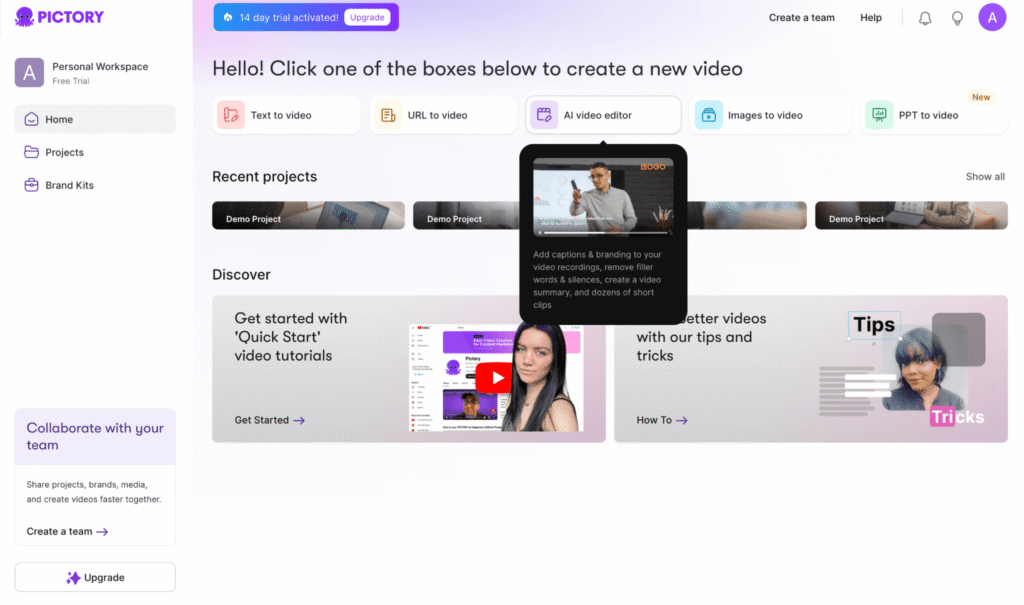
Pictory AI is a next-generation video creation platform that uses artificial intelligence to make professional video production simple and accessible. Unlike traditional editors that require technical skills and hours of manual work, Pictory automates much of the process—letting you turn articles, scripts, or long-form videos into short, polished clips in just a few clicks.
Built for versatility, Pictory AI serves YouTubers, marketers, educators, and small business owners alike. Simply upload your content, and its AI automatically analyzes, summarizes, and enhances it into a visually engaging video.
What makes Pictory stand out is its perfect blend of smart automation and an intuitive, drag-and-drop interface. Users love how it handles scene selection and editing intelligently, allowing them to focus on creativity instead of technical details.
By bridging the gap between ideas and finished videos, Pictory AI has become a favorite tool for creators who want to streamline production without compromising quality. If you’re looking for a fast, cloud-based AI video editor that’s both powerful and easy to use, Pictory is one of the best choices available today.
Key Pictory AI Features That Make Video Editing Effortless
Pictory AI video editing is packed with features designed to remove the complexity from video creation while boosting output quality. Here’s a closer look at the Pictory AI features that have made it a favorite among creators and marketers in 2025:
AI-Powered Text-to-Video Creation
Turn any written content—blog posts, scripts, or articles—into engaging videos automatically. The platform analyzes your text, selects the most relevant visuals, and assembles a polished video, cutting down hours of manual editing to just minutes.
Automatic Captions and Subtitles
Adding captions is no longer a chore; Pictory instantly generates accurate subtitles for every video. This not only improves accessibility but also increases engagement for viewers watching without sound.
Intelligent Video Summarization
Create short, impactful highlights from longer video footage. Pictory’s AI identifies the best moments, letting you produce concise promotional clips or summaries for social media, webinars, or product demos.
Massive Stock Asset Library
Access millions of royalty-free video clips, images, and music tracks from integrated stock libraries like Getty Images and Storyblocks. This Pictory AI feature ensures users have visual and audio assets for every possible use case.
AI Voiceovers and Multi-Language Support
Need professional narration? Pictory can transform your scripts into natural-sounding AI voiceovers, with a growing library of voices and multiple language options—making scaling your content across global markets seamless.
User-Friendly Drag-and-Drop Interface
Pictory AI video editing offers an intuitive, web-based interface that requires no prior editing experience. The streamlined dashboard and drag-and-drop controls mean every step—from uploading content to exporting the final video—is straightforward and fast.
Whether you’re a beginner or an expert, these features combine to set Pictory apart as the best AI video editor for creators seeking both power and simplicity in their video editing workflows
Pictory AI Pricing Plans: Which One is Right for You?
Understanding the cost of Pictory AI video editing is crucial for creators wanting to balance budget and functionality. Pictory offers a range of pricing plans designed to fit different needs—from individual content creators to teams and enterprises.
Starter Plan
Priced at $19 per month, this entry-level plan is perfect for beginners and solo creators. It includes essential features such as:
- Up to 30 video minutes per month
- Access to automated captions and basic editing tools
- Access to stock media library
- Standard video resolution suitable for social media and platforms like YouTube
Professional Plan
At $39 per month, the Professional plan unlocks more advanced options, including:
- 60 video minutes per month
- Premium video resolution and branding options
- Multiple AI voiceovers and expanded stock assets
- Priority support and faster video processing
Team Plan
For collaborative teams, the Team plan offers enhanced features with pricing starting around $79 monthly. It includes:
- More video minutes
- Dedicated brand kit management
- Team collaboration tools and user permissions
- Extended storage and analytics
Enterprise Plan
Custom-priced for large organizations with intensive video production needs, this plan offers:
- Unlimited video creation minutes
- Tailored onboarding and support
- Advanced security and integrations
Pictory AI’s pricing reflects its value, enabling creators to choose plans that scale with their growth without overspending. Whether an individual wanting to make quick videos or a marketing team producing bulk content, Pictory’s pricing structure is transparent and competitive.
Choosing the right plan means assessing your video volume needs, feature preferences (like AI voiceovers or collaboration), and budget—ensuring you get the most from this best AI video editor.
How to Get Started with Pictory AI Video Editing
Getting started with Pictory AI video editing is simple, even if you’re new to video creation. Follow these easy steps to create your first stunning video effortlessly:
Step 1: Sign Up and Choose a Plan
Begin by signing up on the Pictory website and select the pricing plan that fits your content needs—there’s even a free trial to test out the features without commitment.
Step 2: Upload Your Content
You can start by uploading a script, blog post, or an existing video. Pictory’s AI will analyze your content for key messages, making it easy to transform text into a polished video or summarize long videos into highlights.
Step 3: Customize Your Video
Use the intuitive drag-and-drop interface to tweak scenes, add captions, choose background music from the extensive stock library, and apply AI-generated voiceovers if needed. The interface requires no advanced editing skills.
Step 4: Preview and Edit
Review the AI-generated video in the built-in previewer and make adjustments if necessary—alter text, replace images, or modify timing to ensure your video conveys exactly what you want.
Step 5: Export and Share
Export your final video in high resolution, ready for upload to YouTube, social media, or your website. Pictory supports multiple formats and aspect ratios tailored for different platforms.
By following this straightforward workflow, you can turn content ideas into professional videos in a fraction of the time it traditionally takes. Pictory AI’s smart automation and user-friendly tools empower users to create videos that stand out without the steep learning curve.
Why Pictory AI is one of the Best AI Video Editor in 2025
Pictory AI has earned its place as the best AI video editor in 2025 through a perfect blend of innovation, ease of use, and impressive results. Here’s why it stands out from the growing competition:
Seamless Automation with Human Touch
Pictory’s AI does the heavy lifting—from script analysis and scene selection to adding captions and voiceovers—while keeping users in control of the creative process. This balance allows quick video creation without sacrificing customization or quality.
Versatility Across Content Types
Whether converting blog posts to videos, summarizing webinars, or creating social media clips, Pictory handles it all. Its flexible AI adapts across industries, making it ideal for marketers, educators, YouTubers, and beyond.
Extensive Stock Library and Voice Options
With millions of premium stock images, clips, and music tracks integrated, plus natural AI voiceover choices in multiple languages, Pictory gives creators all the building blocks they need for compelling videos in one platform.
Cloud-Based Convenience
No installations or powerful hardware needed—Pictory is fully cloud-based. Access your projects from anywhere, collaborate with teams, and benefit from automatic updates delivering fresh features continuously.
Proven User Satisfaction
Pictory users report significant productivity boosts and smoother workflows, praising its intuitive interface and dependable output quality. Having created over 10 million videos globally, it’s a trusted tool for video creation at scale.
For content creators who want to save time without compromising impact, Pictory AI video editing remains unmatched, earning its reputation as a top choice in AI video editing software.
Pros and Cons of Pictory AI Video Editing
Before diving into Pictory AI video editing, it’s valuable to understand its strengths and any potential limitations to ensure it aligns with your needs.
Pros
- Ease of Use: Pictory’s intuitive interface combined with automation means even beginners can produce professional-quality videos quickly.
- Powerful AI Features: From text-to-video conversion to automatic captions and voiceovers, the platform handles many time-consuming tasks seamlessly.
- Extensive Media Library: Access to millions of high-quality stock videos, images, and music enhances creative possibilities without extra costs.
- Cloud-Based Access: Work from anywhere without installing software or worrying about device specs; collaborate easily with teams.
- Multi-Language Support: AI voiceovers in several languages allow creators to reach global audiences effortlessly.
Cons
- Pricing for Heavy Users: While affordable for most, creators with very high video production volumes may find costs rising with premium plans.
- Limited Advanced Editing: Pictory prioritizes simplicity, so it may not meet all needs for highly advanced, frame-by-frame editing or special effects.
- Learning Curve for AI Tools: Some users might need time to fully leverage AI features for maximum benefit, especially those new to AI-powered editing.
Overall, the pros of Pictory AI video editing make it a standout choice for most creators looking to streamline video production, while the cons mainly affect niche or power users who require more granular control.
Conclusion
Pictory AI video editing transforms video creation from a complex process into a quick, effortless experience. With features like text-to-video conversion, auto subtitles, and smart video summarization, it empowers creators of all skill levels to produce professional-quality videos with ease.
Its flexible pricing—from affordable Starter to Enterprise plans—caters to individuals, small teams, and large organizations alike. Backed by a rich stock media library, cloud-based workflow, and multilingual AI voiceovers, Pictory stands out as one of the best AI video editors in 2025.
Praised for saving time and simplifying workflows, Pictory is a must-have tool for modern content creators. Try its free trial today and see how easily you can create stunning videos.