Music lovers across the globe can now experience a new world of music discovery by choosing to connect Spotify with ChatGPT. This exciting integration, recently launched by OpenAI and Spotify, allows users to shape their listening experience directly through AI-powered conversations and personalized music recommendations. If you want to stay ahead in personalized music curation, it’s time to connect Spotify with ChatGPT and explore everything this seamless partnership has to offer.
Connecting Spotify with ChatGPT makes it possible to request song suggestions, build playlists, and even control playback—all within the intuitive ChatGPT interface. This means that, instead of jumping between apps or spending hours searching for the right mix, you can now connect Spotify with ChatGPT, describe what you want to hear, and watch your listening experience transform with smart automation and AI-driven context.
Why Connect Spotify with ChatGPT?
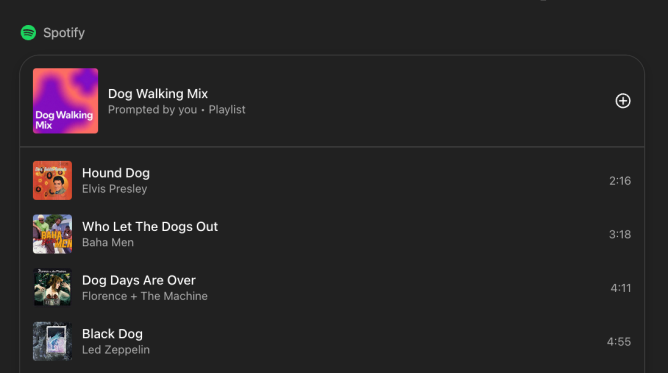
The primary reason to connect Spotify with ChatGPT lies in convenience and personalization. When you connect Spotify with ChatGPT, you allow the AI to access your listening habits, liked songs, and favorite playlists. This rich data helps the assistant generate tailored recommendations that align with your music tastes. Whether you want an upbeat playlist for a morning workout, relaxing tunes for your bedtime routine, or a specific genre mix for an event, connecting Spotify with ChatGPT brings your imagination to life.
Another compelling benefit is the ability to exercise hands-free control over your Spotify account. Once you connect Spotify with ChatGPT, you can instruct the AI to play, pause, or skip tracks, curate new playlists, add or remove songs from your library, and even manage who you follow—all in real time. This level of integration minimizes interruptions and maximizes listening enjoyment.
How to Connect Spotify with ChatGPT
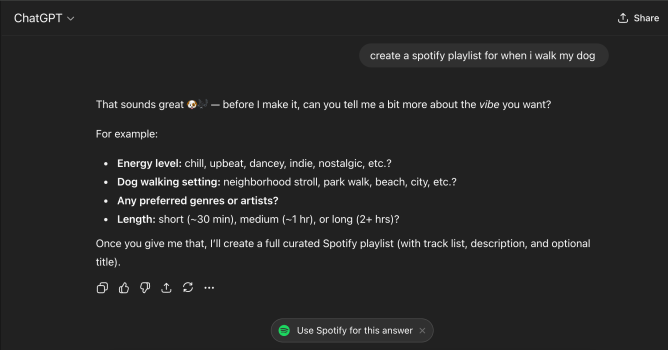
The process to connect Spotify with ChatGPT is clear and user-friendly.
Step 1: Start a Chat in ChatGPT
Open ChatGPT and begin a conversation as you normally would.
Step 2: Mention Spotify in Your Prompt
Type a message related to Spotify — for example, “Recommend songs on Spotify” or “Play my workout playlist.”
Step 3: Click the ‘Use Spotify for this answer’ Button
Once Spotify is detected in your prompt, ChatGPT will display a “Use Spotify for this answer” button. Click it to begin the connection process.
Step 4: Authenticate Securely
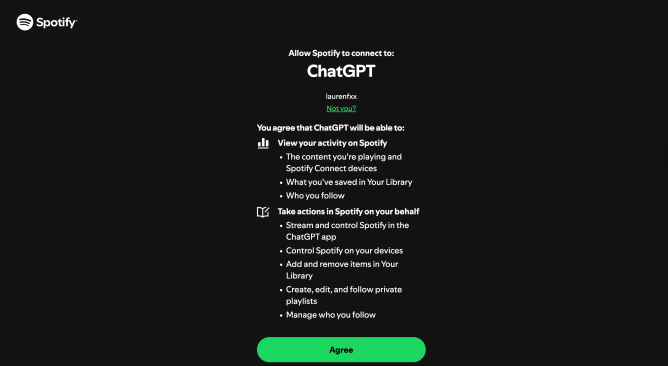
You’ll be redirected to a secure Spotify authentication page. Log in to your Spotify account and grant permission for ChatGPT to access your data.
Step 5: Complete the Connection
After authentication, ChatGPT will successfully connect with your Spotify account. From now on, it can access contextual data like your recently played tracks and followed playlists to give more personalized recommendations.
Step 6: Enjoy Personalized Spotify Recommendations
With the connection active, ChatGPT can suggest songs, playlists, and artists based on your listening habits — all tailored to your preferences.
Step 7: Manage or Disconnect Anytime
Your privacy is always protected. ChatGPT only accesses the minimum data needed for recommendations and doesn’t share your music content with OpenAI for training.
If you wish to disable the integration, simply go to your account settings and disconnect Spotify from ChatGPT at any time.
Powerful Use Cases When You Connect Spotify with ChatGPT
When you connect Spotify with ChatGPT, your music experience expands far beyond standard search and playback:
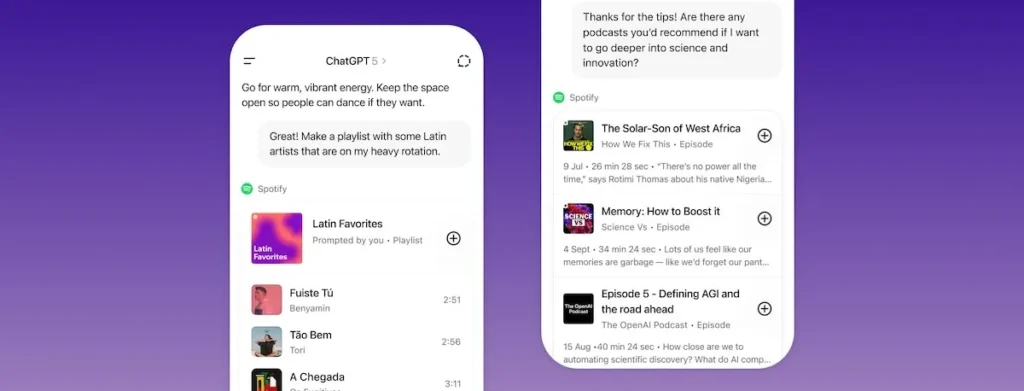
- Create unique playlists: Ask ChatGPT to generate playlists according to mood, activity, event, or genre preferences, and let AI craft a personalized lineup based on your Spotify history.
- Get smart song and artist recommendations: Prompt ChatGPT for songs from your top artists, new releases in your favorite genres, or hidden gems you might have missed.
- Automated playlist management: Easily add or remove songs from your Spotify library via conversation, or have ChatGPT edit and organize private playlists for special occasions.
- Control playback with your voice: Direct ChatGPT to start, stop, skip, or replay tracks, all without switching screens or using Spotify’s main app.
This is all made possible because you chose to connect Spotify with ChatGPT and unlock the full possibilities of conversational AI and personalized music enjoyment.
Security and Privacy Considerations
When you connect Spotify with ChatGPT, your data is handled responsibly under both platforms’ privacy policies. Spotify clearly states that none of your music or podcast content will be used by OpenAI for AI training. The data shared includes basic information such as your playlists, played songs, library contents, and people or artists you follow, along with your IP address and approximate location for tailoring content. You can always review or revoke permissions if you want to disconnect Spotify with ChatGPT.
Who Can Connect Spotify with ChatGPT?
The feature to connect Spotify with ChatGPT is available in English, across 145 countries, and is compatible with both free and premium Spotify accounts. Premium users get extra tailored experiences thanks to advanced personalization capabilities. The integration works seamlessly on both the web and mobile versions of ChatGPT, ensuring everyone can access the benefits to connect Spotify with ChatGPT, regardless of their device or subscription level.
Spotify is part of a growing ecosystem of apps now integrated with ChatGPT, joining the ranks of Booking.com, Canva, Coursera, Expedia, Figma, and Zillow. This is only the beginning for users who want to connect Spotify with ChatGPT and streamline music discovery through artificial intelligence.
Getting Started: Connect Spotify with ChatGPT Today
The future of music streaming is here. If you want curated playlists, smarter recommendations, and frictionless music management, make the move to connect Spotify with ChatGPT now. Simply initiate a conversation in ChatGPT, mention Spotify, and enable the integration for a world of possibilities. Don’t miss out on the opportunity to connect Spotify with ChatGPT—where innovation meets your unique taste in music.